Showing posts with label Ragnarok. Show all posts

Tuesday, December 7, 2010

Ragnarok Dual Login Valkyrie Server PH

~~Ragnarok Dual Login Valkyrie Server PH~~

1. Download the valexe here: valexe

2. Make a backup files of your own valexe.

3. Paste the valexe you download on your Ragnarok Online folder.


The dual is still working December 07, 2010

Read more...

Ragnarok Killsteal Bot

~~Ragnarok Killsteal Bot~~

Here is my Misc.pm -- Misc.pm

If you don't want to use my Misc.pm you can edit your own Misc.pm and follow the steps below.

1. Locate your Misc.pm inside your src folder inside your openkore bot.

2. Create a backup in case you did something wrong.

3. Open it using notepad or wordpad.

4. Locate sub objectInsideSpell { inside the misc.pm and add this line below it.

return 0 if ($config{'rabidDog'} || $config{'killSteal'});


5. Locate sub objectIsMovingTowardsPlayer { inside the misc.pm and add this line below it.
 
return 0 if ($config{'rabidDog'} || $config{'killSteal'});


6. Locate sub checkMonsterCleanness {  inside the misc.pm and add this line below it.

return 0 if ($config{'rabidDog'} || $config{'killSteal'});


 7. Locate sub positionNearPlayer {  inside the misc.pm and add this line below it.


return 0 if ($config{'rabidDog'} || $config{'killSteal'});


8. Open your config.txt inside your control folder and add killSteal 1 anywhere in your config.


9. And in your timeouts.txt inside your control change this ai_attack_waitAfterKill 0.7 to ai_attack_waitAfterKill 0.1


Note: If you don't have bot yet, visit this link Ragnarok Online Bot


Read more...

Ragnarok Online Bot

~~Ragnarok Online Bot~~

1. Download the latest SVN version of openkore. Here's the official link Openkore Bot

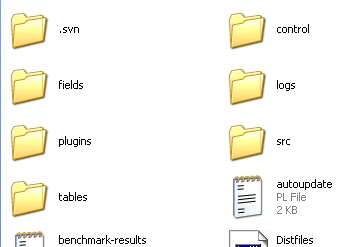
2. Extract the files.It should look like this:

3. Run the start.exe

4. Choose your server and enter username and password.

5. After you select your server and input your username and password, choose you character and there you. Enjoy botting. 


Read more...

Installing Macro Plugins

~~Installing Macro Plugins~~

If you don't have bot yet, visit this link: Ragnarok Online Bot

1. Download the Macro Plugin version 2.0.3 rev7153 on Macro Plugins Download

2. Extract the files and put it on a folder name plugins.

D:\openkore_ready\plugins

3. Paste the plugins folder on your openkore folder, it should look like this:
D:\openkore_ready\


4. Make a new text files and name it as macros.txt
 
D:\openkore_ready\ config\


5. Now you're done, all you need to do is make some macro and paste it on macros


Read more...